
Anatomy of Helidon MCP + Ollama: Designing AI-Enhanced Java Microservices
A fresh take: Java, AI, and real world APIs finally working together.

Building modern AI-powered applications isn’t just about sending prompts to a model. The real magic happens when you can augment LLMs with external tools and services, like fetching live weather data. Recently, Helidon, one of my favorite java frameworks, introduced MCP servers, giving Java developers a new way to bridge LLMs with real-world APIs through the Model Context Protocol. That means your AI app isn’t limited to what the model knows it can now reach out, call tools, and bring live information into the conversation.
In this blog, we’ll walk through how to wire together LangChain4j, Ollama, and Helidon to create an AI microservice that answers weather-related questions. Along the way, we’ll unpack the moving parts: chat models, MCP clients, tools, and service endpoints.
🔹 High-Level Architecture
At a glance, our app looks like this:
User → Helidon HTTP Endpoint → LangChain4j AI Service
       ↳ Ollama (LLM: Qwen/Llama3/etc.)
       ↳ MCP Client (Weather API tool)
Helidon → lightweight Java microservice framework
LangChain4j → Java framework for connecting LLMs + tools
Ollama → runs local open-source models (Qwen3, Llama3, Mistral, etc.)
MCP (Model Context Protocol) → standard way to plug external services into AI agents
The Flow:
Ollama ← MCP Client ← MCP Server ← API ← UI
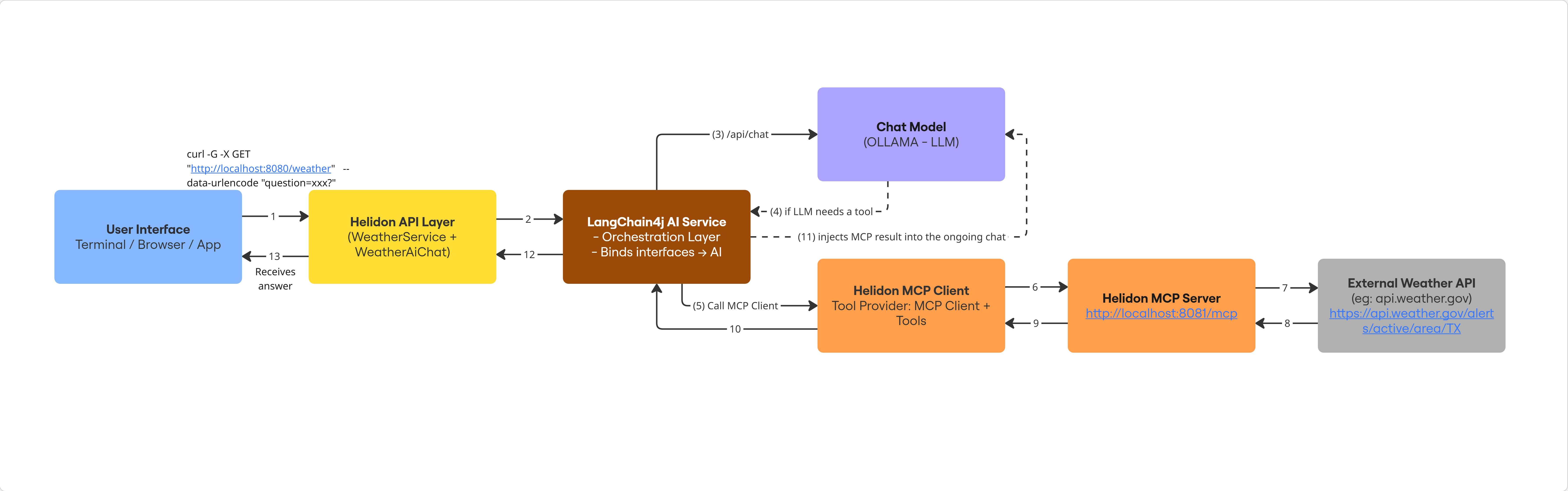
Here’s how the runtime pieces connect:
[User Interface]
     ↓
 [Helidon API Layer] (WeatherService + WeatherAiChat)
     ↓
 [MCP Client] (DefaultMcpClient + HttpMcpTransport)
     ↓
 [MCP Server] (Helidon MCP server exposing weather tool)
     ↓
 [Ollama LLM] (Llama3/Qwen answering queries with context)
🧩 Separation of Responsibilities
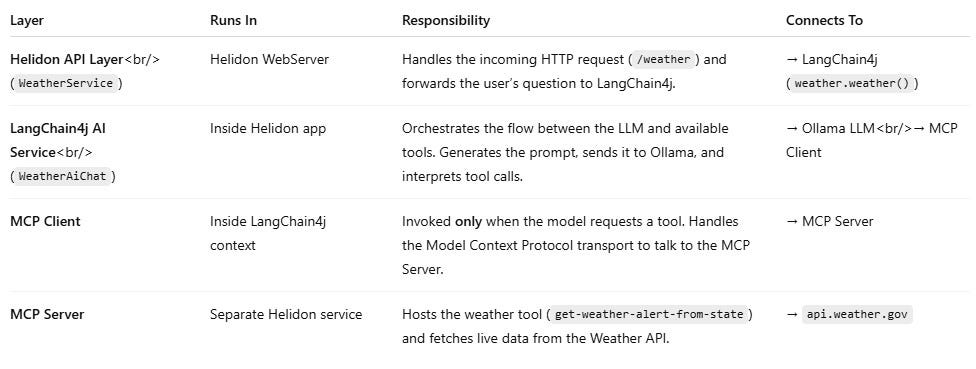
When the user calls /weather, not every layer runs at once.
Each component plays a specific role in the pipeline — and the MCP Client only activates when the LLM decides a tool is needed.
🔹 Component Breakdown
1. MCP Client (mcp-client/)
Houses
WeatherService.java, which wires:An OllamaChatModel (local LLM from Ollama at
http://localhost:11434).
An MCP Client (
DefaultMcpClient) that connects to the MCP server athttp://localhost:8081/mcp.
Exposes a simple HTTP GET API so users can send queries like:
GET http://localhost:8080?question=Will it rain in Dallas tomorrow?
The WeatherAiChat interface defines the AI contract:
@SystemMessage(”You are a helpful assistant that provides weather forecasts.”)
String weather(@UserMessage String question);
2. MCP Server (mcp-server/ and mcp-server-declarative/)
Two flavors provided:
Imperative (
mcp-server/) → explicit server wiring via Java code.Declarative (
mcp-server-declarative/) → YAML-driven configuration + annotated classes.
Both expose the MCP endpoint (
/mcp) that the client can consume.These servers wrap external APIs (like OpenWeather or a mock weather provider) into MCP tools.
3. Ollama (Local LLM)
Runs the base model (
llama3.1,qwen3:1.7b, etc.) locally.Provides the “reasoning engine” that interprets the query, decides if it needs external tools, and then integrates the MCP tool results.
4. API Layer (Helidon)
A thin HTTP service that exposes AI capabilities to the outside world.
In our example,
WeatherServiceis registered as an HttpService.The user calls:
GET /?question=Will+it+rain+in+Dallas+tomorrow
→ The system routes through MCP and Ollama → returns a natural-language answer.
5. User Interface
Could be as simple as
curl, a browser, or a frontend app (React, Angular).Doesn’t care about the internal wiring — just talks to the API.
🔹 Project File Structure
weather-application/
 ├── mcp-client/
 │    └── src/main/java/io/helidon/extensions/mcp/weather/server/client/
 │         ├── Main.java
 │         ├── WeatherAiChat.java
 │         ├── WeatherService.java
 │         └── package-info.java
 │    └── resources/application.yaml
 │
 ├── mcp-server-declarative/
 │    └── src/main/java/io/helidon/extensions/mcp/weather/server/declarative/
 │         ├── Main.java
 │         ├── McpServer.java
 │         └── package-info.java
 │    └── resources/application.yaml
 │
 ├── mcp-server/
 │    └── src/main/java/io/helidon/extensions/mcp/weather/server/
 │         ├── Main.java
 │         └── package-info.java
 │    └── resources/application.yaml
 │
 ├── README.md
 └── pom.xml
🔹 Module 1: MCP Client
The MCP Client is the entry point of our application. It’s responsible for:
Bootstrapping the Helidon WebServer
Exposing a
/weatherendpoint to usersConnecting to Ollama (local LLM)
Connecting to the MCP Server (via HTTP transport)
Wiring everything through LangChain4j’s AI service layer
📌 Main.java
class Main {
    private Main() { }

    public static void main(String[] args) {
        LogConfig.configureRuntime();
        Config config = Config.create();

        WebServer.builder()
                .config(config.get(”server”))
                .routing(routing -> routing.register(”/weather”, new WeatherService()))
                .build()
                .start();
    }
}
📌 WeatherAiChat.java
import dev.langchain4j.service.UserMessage;
import dev.langchain4j.service.V;

public interface WeatherAiChat {
    @UserMessage(”You are a weather journalist. {{question}}”)
    String weather(@V(”question”) String question);
}
📌 WeatherService.java
@Service.Singleton
class WeatherService implements HttpService {

    private final WeatherAiChat weather;

    WeatherService() {
        ChatModel model = OllamaChatModel.builder()
                .baseUrl(”http://localhost:11434”)
                .modelName(”llama3.1”)
                .timeout(Duration.ofMinutes(3))
                .build();

        McpTransport transport = new HttpMcpTransport.Builder()
                .timeout(Duration.ofMinutes(10))
                .sseUrl(”http://localhost:8081/mcp”)
                .logRequests(true)
                .logResponses(true)
                .build();

        McpClient mcpClient = new DefaultMcpClient.Builder()
                .transport(transport)
                .build();

        ToolProvider toolProvider = McpToolProvider.builder()
                .mcpClients(List.of(mcpClient))
                .build();

        this.weather = AiServices.builder(WeatherAiChat.class)
                .chatModel(model)
                .toolProvider(toolProvider)
                .build();
    }

    @Override
    public void routing(HttpRules rules) {
        rules.get(this::weatherChat);
    }

    private void weatherChat(ServerRequest request, ServerResponse response) {
        String question = request.query().get(”question”);
        String answer = weather.weather(question);
        response.send(answer);
    }
}
📌 application.yml
server:
  port: 8080
  host: 0.0.0.0
🔹 Module 2: MCP Server (Imperative)
The MCP Server is the “toolbox” side of our app. It exposes the get-weather-alert-from-state tool that queries the National Weather Service API.
public class Main {
    private static final Jsonb JSON = JsonbProvider.provider().create().build();
    private static final WebClient WEBCLIENT = WebClient.builder()
            .baseUri(”https://api.weather.gov”)
            .addHeader(”Accept”, “application/geo+json”)
            .addHeader(”User-Agent”, “WeatherApiClient/1.0 ([email protected])”)
            .build();

    public static void main(String[] args) {
        Config config = Config.create();
        WebServer.builder()
                .config(config.get(”server”))
                .routing(routing -> routing.addFeature(
                        McpServerConfig.builder()
                                .name(”helidon-mcp-weather-server-imperative”)
                                .addTool(tool -> tool.name(”get-weather-alert-from-state”)
                                        .description(”Get weather alert per US state”)
                                        .schema(createWeatherSchema())
                                        .tool(Main::getWeatherAlertFromState))))
                .build()
                .start();
    }
}
📌 application.yml
server:
  port: 8081
  host: 0.0.0.0
🔹 Module 3: MCP Server (Declarative)
The Declarative MCP Server offers the same tool but with annotations instead of imperative wiring.
@Mcp.Server(”helidon-mcp-weather-server”)
class McpServer {
    @Mcp.Tool(”Get weather alert per US state”)
    List<McpToolContent> getWeatherAlertFromState(String state) {
        // Calls api.weather.gov and returns alerts
    }
}
📌 application.yml
server:
  port: 8081
  host: 0.0.0.0
🔹 Module 4: Demo Walkthrough
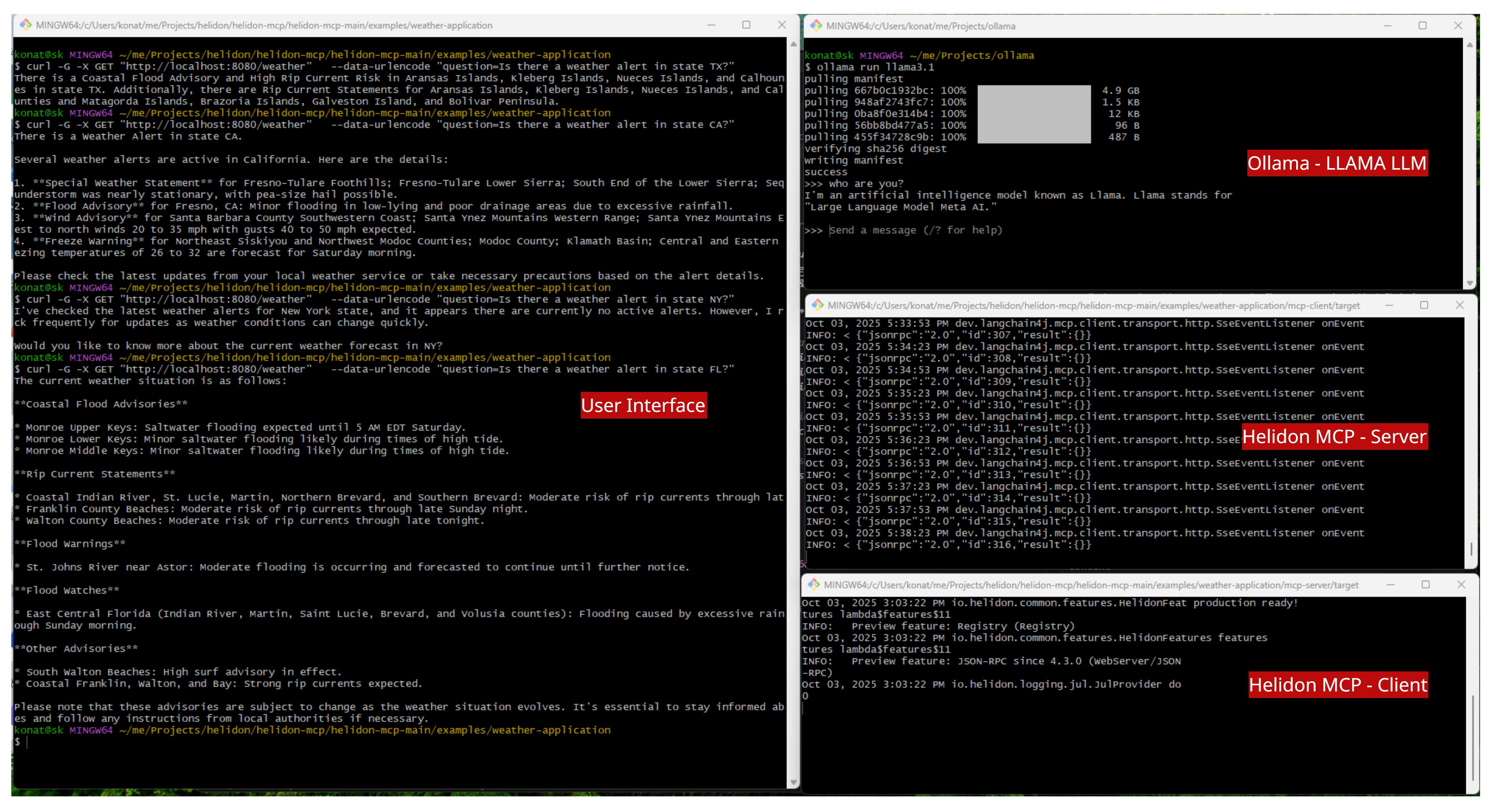
First, make sure ollama is running.
ollama run llama3.1Build the whole weather application from the weather-application directory.
mvn clean packageThen run on of the server application.
java -jar mcp-server/helidon-mcp-weather-server.jarIn another terminal, run the client application.
java -jar mcp-client/helidon-mcp-weather-client.jarExample query:
curl -G “http://localhost:8080/weather” \
     --data-urlencode “question=Is there a weather alert in state TX?”
Response:
There is a Coastal Flood Advisory and High Rip Current Risk...
🔹 Summary & Key Takeaways
MCP Client → entry point exposing
/weatherAPI, connects Ollama + MCP.MCP Server → provides weather tools (imperative or declarative).
Ollama → runs the local LLM (LLaMA, Qwen, Mistral).
Demo → queries flow User → API → MCP Client → MCP Server → Weather API → LLM → back to User.
💡 Takeaway: LangChain4j + Ollama + MCP + Helidon = a powerful recipe for AI microservices that are local, extensible, and production-ready.
Java may not be the first language people think of for AI, but that’s exactly why I’m exploring it. Follow along for more experiments, tutorials, and stories from the intersection of AI and Java development.